At rest · click the notch
The notch, finally
doing something.
A Dynamic Island for macOS, done properly. Your day, the weather, your files and your music, in the one place on screen that was already dark. It stays invisible until it has something to say.
Free, and open source under the MIT License. No trial to run out, no licence key to lose, no account to make.
- Version
- 2.4.0
- Requires
- macOS 26 or later
- Processor
- Apple silicon
- Download
- 6.2 MB
Actual size
This is how much of your screen it takes
Everything above is drawn about life size so you can read it. Here it is at its real fraction of a real display — same shape, same spring, on the 1512 points of a 14-inch MacBook Pro.
210 × 32 pt of 1512 × 982
At rest it is the cutout and nothing more, which is where it spends nearly all of its life. Open, it is 368 × 176 pt — about a twenty-fifth of the display, hanging off an edge that was already black.
At a glance
The whole surface, on one screen
Everything above, plus the parts that are not activities and so never got a stop on the tour.
- The pages
- Today, Music and Weather, and two fingers turn between them
- Two or three
- The player is on the carousel while there is music, and off it when there is not
- Today
- The date, the next three things on it, and the transport, side by side
- The whole day
- Click the date: today’s all-day items, today’s events and tomorrow’s
- Now playing
- Apple Music, Spotify, anything that reports to the system
- No cover art
- A browser tab or a video with none shows that app’s icon, not a music note
- Track lip
- Point at the cover and the title drops under the notch, badge and all
- Transport
- Seek, previous, play-pause, next, shuffle, repeat — without stealing focus
- Up Next
- The queue it is working through, the output device, and the playback speed
- Scrolling titles
- Long ones scroll, and stop between laps so the opening words stay legible
- Weather
- Now, four readings, five days — and rain in the island when it is raining
- Timers
- A Clock countdown, drawn as Clock’s own ring
- Volume
- The level you just set, where your eyes already are
- Brightness
- The display level, on a switch of its own
- The word
- Every HUD widens the island far enough to spell its own name — Volume, Display
- Instead of Apple’s
- Isleta answers the level keys itself, so macOS never draws its own HUD
- A bar you can drag
- Press anywhere along a level in the notch to send it there, or drag it
- The lean
- Press past the end of a range and it tips that way and springs back
- Meetings
- The one about to start arrives on its own, with a button that joins
- AirPods
- Charge on connect, in the colour Apple’s own battery menu uses
- Battery
- The charger going in and out, and Low Power Mode
- Calls
- That one is happening, and how long it has been going
- Drop shelf
- Drag a file onto the notch; search it, preview it, drag it back out
- Convert
- Images, video, audio, Word, RTF, HTML, spreadsheets and slides to PDF
- Transcribe
- Audio and video, on your Mac, with no permission asked
- Share
- An iCloud link on the clipboard, or AirDrop — plus a history of both
- Lock screen
- What is playing, on a card over the lock, with working buttons
- The locked notch
- Point at it and the padlock widens, with the tap the island gives you unlocked
- Welcome back
- A greeting for the hour, on wake and unlock
- The unlock sound
- A short sound when the Mac comes back, on a switch of its own
- The blur
- A soft ring of desktop around the open island, which is also where you click to close it
- Black, or glass
- Black in a real notch, glass where it floats — decided, not asked
- Gestures
- Two fingers to turn a page, flick to stow, two fingers up to close
- Shortcuts
- ⌃⌥⌘I opens the island; showing your day is yours to assign
- Right-click
- Settings, from anywhere on the island
- Four languages
- English, German, French and Spanish, following your Mac
- Reduce Motion
- Every state still reachable, none of them animated
- No notch
- A floating island on the primary display, so a Mac mini is not left out
The rule
One thing at a time
Only one item is on the Dynamic Island at once, and the more urgent thing wins.
- A volume press interrupts a track. The track is still there underneath when the HUD goes — nothing is dropped, it queues
- One exception, and it is a pair: music takes the sliver left of the notch and a Clock countdown the right. The cutout leaves two
- Nothing goes while you are reading it. With the pointer on the island — or in the blurred ring around it, which counts — whatever is on stage waits
Arriving and browsing are different things
An activity takes the stage because something happened. A page is what the island shows when nothing has, and you opened it to look.
- Your day and the weather are there whether or not your Mac has been busy all morning
- The dots under the cutout say which page you are on, not how much is queued behind it
- The player is the one page with a condition — on the carousel while there is music, off it when there is none
- Your day keeps its music column either way, and goes on saying “Not playing” there
- Move the pointer onto the MacBook notch
- The Dynamic Island peeks, and the trackpad taps once — an invitation to click
- Rest it on the album cover
- A strip drops under the notch saying what is playing
- Click
- It expands, onto your day
- Two fingers left or right
- It turns the page — Today, Music, Weather, and round again. The dots under the cutout say which one you are on, and fade a second or so after you arrive
- Click a dot
- That page, from whichever direction is nearer
- Rest the pointer on an open island
- It stays open for as long as you take. The blurred ring around it counts as the island, so the pointer can rest there too
- Click the ring
- It closes — a click near the island is a click, not a miss
- Right-click, anywhere on it
- Isleta’s own menu, and the way into Settings
- Drag a file onto it
- The shelf opens and takes it
- Click the wand on the shelf
- What Isleta can do to those files — convert, transcribe, link, AirDrop
- Click the date
- The whole day: what is on today, and what is on tomorrow
- Flick it left or right, closed
- It stows out of the way. Click to bring it back
- Swipe up with two fingers
- An open island closes. Up is up, whichever way natural scrolling is set
- Press a volume or brightness key past the end of its range
- The island leans that way and springs back, and keeps leaning while you hold it
- Press or drag the level bar in the notch
- The level goes where you put it. Press the middle of the notch instead and the reading goes away, opening the island
- ⌃⌥⌘I
- Open and close it from anywhere. Rebindable, and it reads your actual layout — Dvorak and AZERTY users see the key they really pressed. The day, the player, the weather, the shelf, the drop history and the last link have shortcuts of their own, unassigned until you assign them.
Settings
And then decide what it gets to tell you
The defaults are the argument this whole page makes. These are for when you disagree with part of it — four panes, and about a third as many controls as 1.x had.
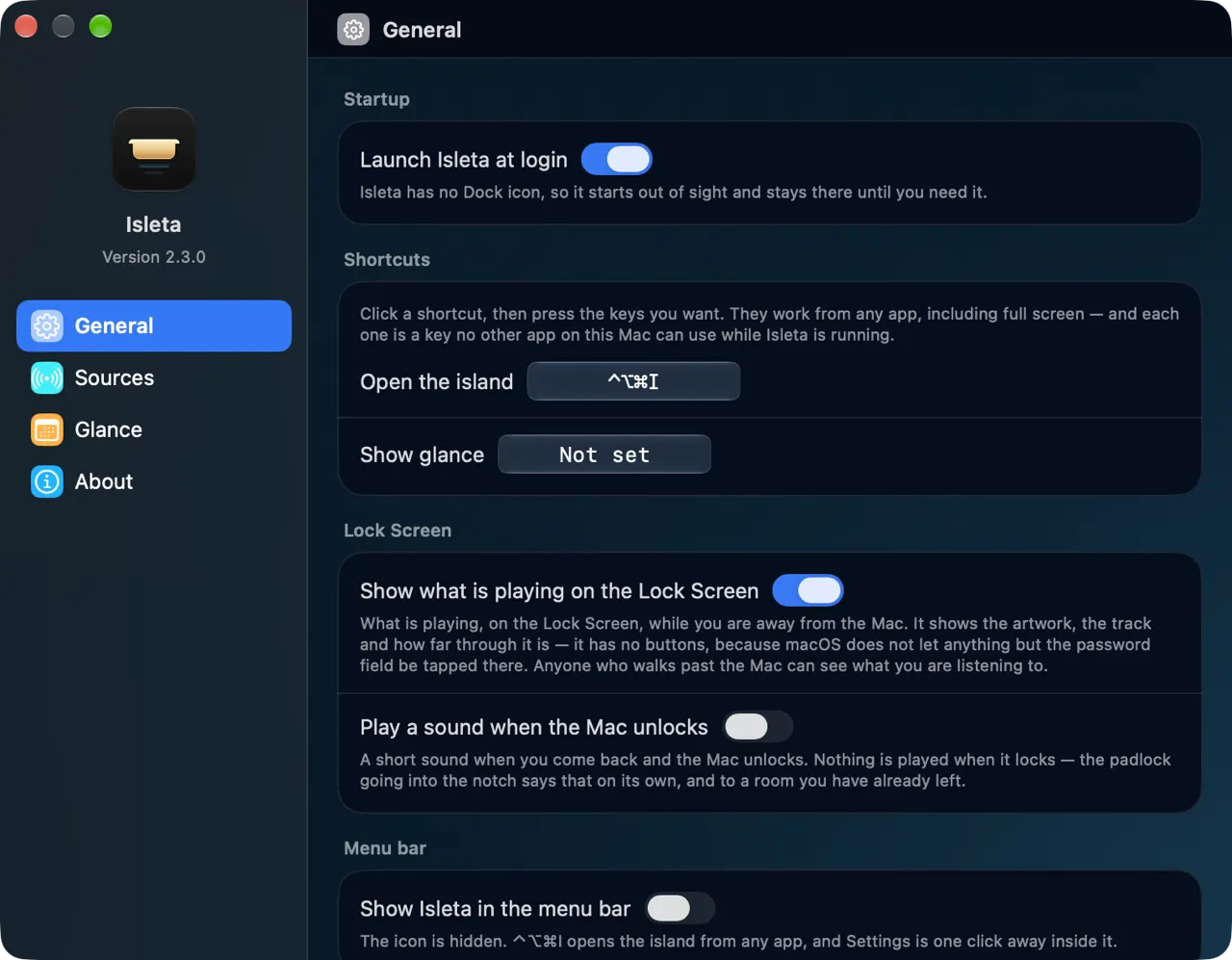
- What it is allowed to say
- Every source is a switch of its own, with what it needs written beside it.
- What is playing, the HUDs, your day, calendar alerts, meetings, timers, Bluetooth devices, power, calls, the shelf, the wake greeting, screen sharing
- Turn one off and it never takes the stage again
- Whether it answers your keys
- Isleta takes the volume and brightness keys itself, and that is how it arrives.
- Nothing is replaced until Accessibility is granted, which the first run asks for by name
- Two switches and not one: volume is recoverable if it gets it wrong, and brightness is the one that leaves you unable to dim your screen
- Either switch puts Apple’s HUD back. So does quitting Isleta
- Where it stays out of
- A list of apps the island leaves alone entirely.
- For full-screen video, or a presentation
- On a Mac with no notch, the floating island can stay invisible until something happens
- What it does not ask
- There is no style picker, no size, no speed and no shadow.
- A notch island has to be optically continuous with the bezel; a floating one has nothing to be continuous with
- So it is black in a real notch and glass where it floats — which was never a matter of taste
- What went in 2.0 were the settings asking you a question Isleta can answer for itself
And on the lock screen
- What is playing follows you there, on a card of the same glass — with previous, play-pause and next that actually work, over a surface where no click is delivered to any app
- The notch up there answers the pointer too: move onto it and the padlock widens, with the same trackpad tap the island gives you unlocked
- Coming back can make a short sound, on a switch of its own beside the card
- Four languages — English, German, French and Spanish — following whichever your Mac is set to
Requirements
Will it run on your Mac?
Two things have to be true. Which display the Dynamic Island turns up on is a separate question, and it has an answer either way.
- Operating system
- macOS 26 or later
- Earlier versions of macOS do not publish the levels and signals the island reads, so there is nothing for it to show.
- Processor
- Apple silicon
- Any M-series Mac. Intel Macs are not supported and are not going to be.
And which screen it appears on
Your MacBook
The Dynamic Island is continuous with the MacBook notch. That continuity is the entire idea.
External monitors
No cutout for the Dynamic Island to be continuous with, so an island up there would just be a black rectangle stuck to the top of the screen. A different product.
Mac mini, Studio, iMac
No notched display at all, so these get a floating Dynamic Island pinned to the top of the primary display — because otherwise there would be nothing to use.
Privacy
Two kinds of network request, and you turned both on
The update check, and the weather. That is the whole list.
- The update check carries nothing about you, and is a switch in Settings
- The weather is asked only once you have given the page a location or typed a city
- Turn the first off and never ask for the second, and Isleta does not touch the network at all
- No account
- No telemetry, no analytics, no crash reporting service
- Nothing about you, what you play, or what your calendar says goes anywhere
- The weather request carries a place and nothing else — no account, no identifier, and only when you have asked for weather
- Transcription runs on your Mac. Nothing is uploaded and no permission is asked
- What is playing is read on your Mac, drawn on your Mac, and forgotten
- Your calendar and the weather are read on your Mac and held in memory — never written to disk, and never in an exported log
- Your settings are a small preferences file in your own user library
Sources
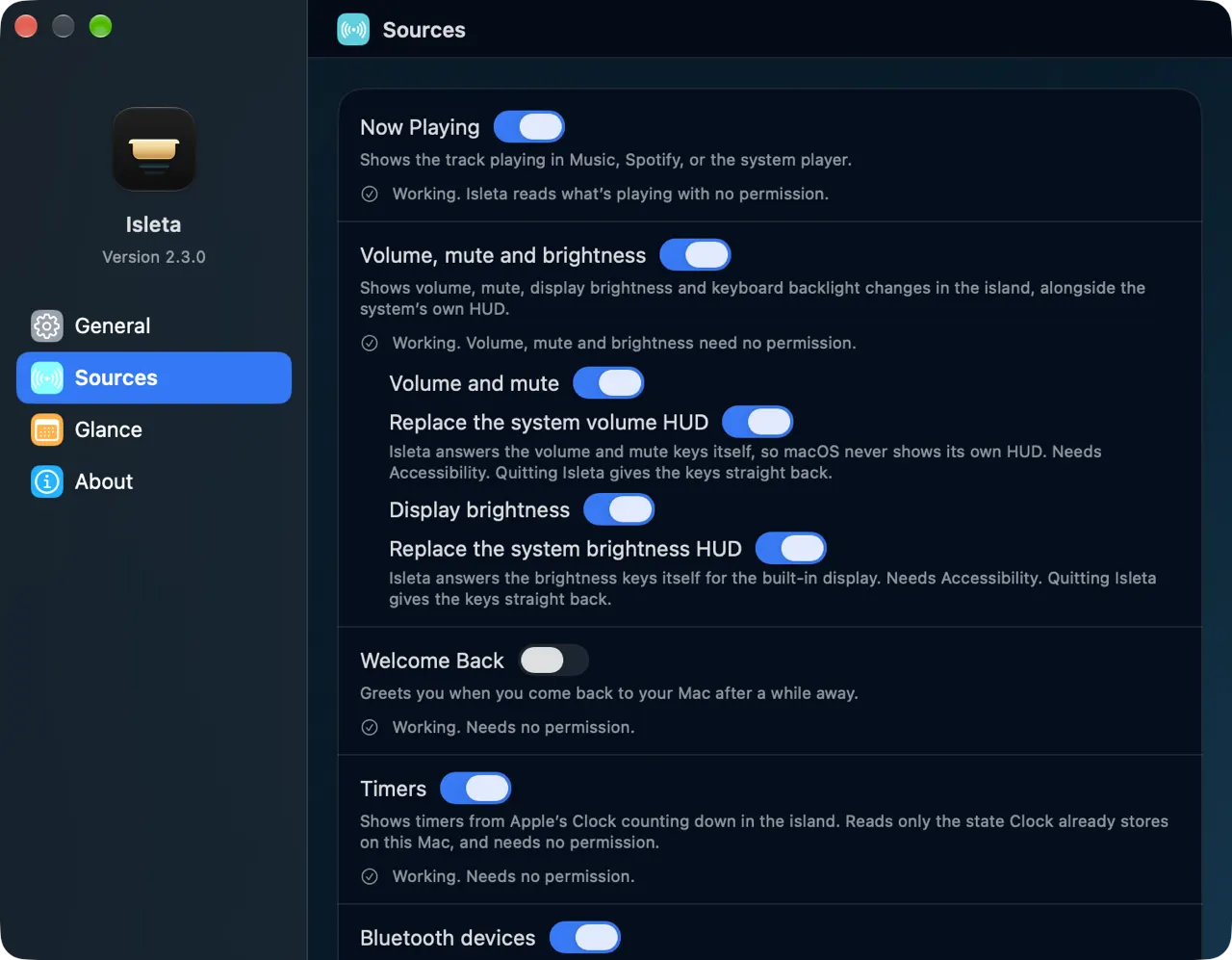
Every source is a switch, and says what it costs
Nothing is bundled into an all-or-nothing “allow Isleta to run”.
- Each source has its own toggle and its own line saying what it needs and whether it is working — Working. Isleta reads what’s playing with no permission.
- Turn one off and the island simply never shows it
- No feature stops working because a different one is off
- Nothing asks again after you have said no
Isleta is free
It is also one person
No company, no funding, and no upgrade waiting to be sold to you later.
- Free partly because a licence check would be a second kind of network request, and the section above has just promised you there is only one
- Open source under the MIT License — the whole app in one repository, so that promise is something you can read rather than take on trust
- If it has earned something, there are two ways to send it. Neither unlocks anything, because nothing is locked
Why it costs nothing, what is in the repository, and what the licence lets you do if this project stops, are on its own page.
Reporting a bug you can reproduce is worth more than either of them.
Give it the notch.
Signed with a Developer ID and notarised by Apple. Not on the Mac App Store: reading which media key you pressed needs Accessibility, which the sandbox does not permit.
A MacBook Pro or Air with a notch · macOS 26 or later
16 releases so far, and every one of them written up.